

Work Item States
Managing work items effectively is at the heart of every project, and Plane provides a robust system for organizing them into states that represent the stages of a work item's lifecycle. As work items transition through these states—from backlog to completion—they reflect the progression of work in your project, forming a clear and efficient workflow for your team.
Where to configure states
Each project defines its own states, managed by a project admin under Settings → (project) → States. This is the default.
Enterprise Grid - workspace level
With workspace governance enabled, states become a single shared set for the whole workspace, managed by a workspace admin under Workspace Settings → States, then applied to every project. Project admins use the shared set but can't edit it. See Under Enterprise Grid governance.
The concept and most mechanics are identical either way; only where you configure them, who can, and a few behaviors differ.
State groups
Every state belongs to one of five groups. The group is the meaning Plane attaches to the state; the name is your label for it.
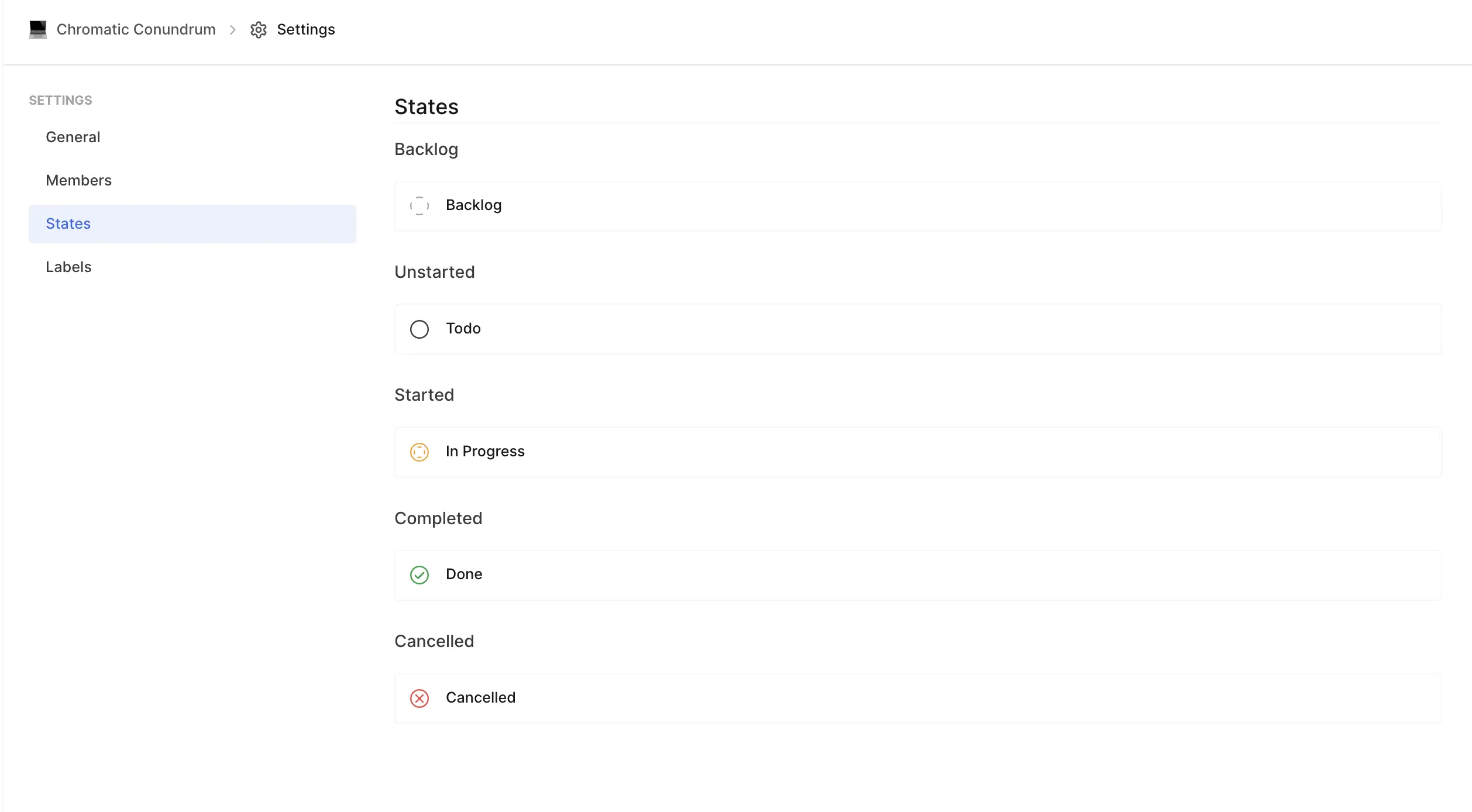
Plane organizes work item states into five primary groups, each serving a distinct purpose in your project’s workflow:
Backlog
Use this group for work items that aren’t ready to be prioritized yet. They might need more discussions or preparation before moving forward. By default, Plane creates a state called Backlog in this group.Unstarted
This group represents work items that are planned but not yet in progress. They’re essentially your team’s to-do list. The default state in this group is Todo.Started
Work items in this group are actively being worked on. They represent ongoing tasks and are crucial for tracking current progress. Plane creates a default state called In Progress here.Completed
These states are for work items that your team has successfully finished. By default, Plane includes a Done state in this group.Cancelled: Use this group for work items that are no longer relevant or actionable. Plane provides a default state called Cancelled for this purpose.
What groups drive
The group, not the state name, determines behavior across Plane:
- Completion and progress - only work items in the Completed group count as done. Cycle and module progress, burndown, and analytics bucket work items by group.
- Archiving - only work items in Completed or Cancelled states are eligible for automatic archiving.
- Ordering - states sort by group first, then by position within the group.
Because of this, changing a state's group changes how its work items are counted. Moving a state into Completed, for example, makes its work items count as done in every chart and progress bar.
The default state
Exactly one state is the default - the state new work items get when none is chosen. New projects start with Backlog as the default.
To change it, open a state and choose Mark as default. The previous default is cleared automatically; there is always exactly one.
Enterprise Grid
The default is not a flag on the state and there is no "Mark as default." The default is the starting state of the workflow, set on the Workflows page. A governed workspace's default workflow starts at Todo.
Triage state
Triage is a special, system-managed state used as the holding area for intake submissions - items land in Triage before being accepted into the project's normal flow.
- There is one triage state per project, or one per workspace under governance.
- "Triage" is a reserved name - you cannot name a state Triage.
- You cannot create a state in the Triage group, and you cannot delete the triage state.
- Triage is kept out of normal state lists and excluded from analytics.
Manage states
States are shown grouped. Use the + on a group to add a state to it.
Create - set a name, a color, and an optional description. The group is determined by which group you add the state under. A duplicate name is rejected.
Enterprise Grid:
State names must be unique across the whole workspace, and the check is case-insensitive - "Todo" and "todo" are treated as the same. (When governance is first enabled, same-named states from different projects are merged into one.)
Edit - change the name, color, or description at any time. To change a state's group, drag it into another group.
Reorder and regroup - drag a state to reorder it within its group, or drag it into a different group to reassign it. You cannot drag away the last state in a group - every group must keep at least one state.
Delete - remove a state, subject to these rules:
- The default state cannot be deleted. Set a different default first.
- A state with work items cannot be deleted - there is no automatic reassignment. Move its work items to another state first, then delete it.
- The triage state cannot be deleted.
- A group's last remaining state cannot be deleted.
Deleting a state is permanent.
Enterprise Grid
A state also cannot be deleted while a workflow uses it - the error names the workflows. Remove the state from those workflows first. Project admins cannot create, edit, or delete states at all; state management happens at the workspace level.
Restricting work item creation in a state
Whether work items can be created directly in a given state is a workflow setting, not a property of the state itself. In a workflow, each state has an allow work item creation toggle; turn it off for states that should only be reached by moving an existing work item (like "Done"). See Workflows.
Under workspace governance
When governance is on, states are a single shared catalog for the whole workspace:
- One shared set that every governed project draws from. A project's visible states are the ones used by the workflows its work item types resolve to.
- Names are unique across the workspace, case-insensitive.
- One workspace triage state.
- The default concept moves to the workflow's starting state.
- Project admins cannot edit states; deleting a catalog state is blocked while a workflow references it.
See Workspace governance for how governance works overall.
Warnings and limitations
- The default state cannot be deleted - reassign the default first.
- A state with work items cannot be deleted - move those work items first; there is no automatic reassignment.
- Every group must keep at least one state.
- "Triage" is reserved and cannot be created as a group or deleted.
- State names must be unique - within the project, or across the workspace (case-insensitive) under governance.
- Changing a state's group re-buckets its work items for progress, analytics, and archiving.
- Under governance, a catalog state can't be deleted while a workflow references it, and project admins can no longer edit states.